
CRM Software
The calling CRM for sales teams – auto dialer, leads, follow-ups, deposits, commission and reports in one system. Try the live demo.
The calling CRM for sales teams
Leads, Lead Sheet, auto dialer, follow-ups, client pipeline, deposit approval, targets & commission, attendance, reports and one-click software updates – one secure web system for admins, team leaders and callers.
One-click login as Main Admin, Team Leader or Caller – no password needed.
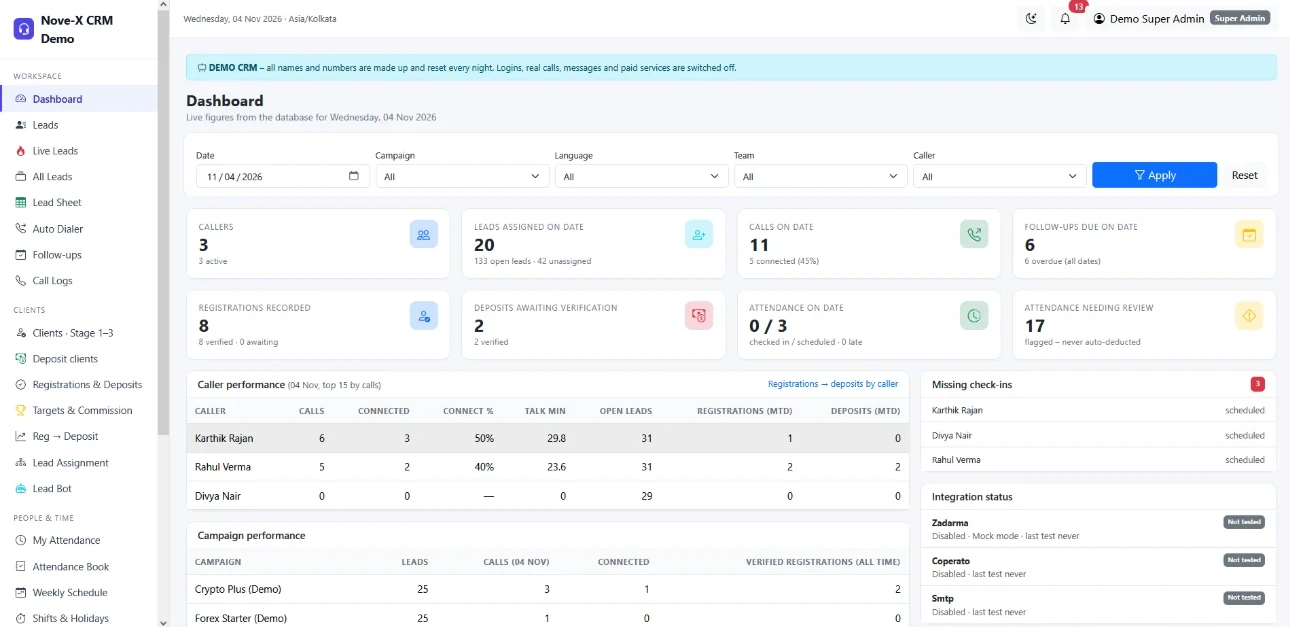
Built for teams that sell on the phone
Spreadsheets lose numbers, callers forget call-backs and managers cannot see who is really working. Nove-X CRM puts every lead, call, follow-up and deposit in one place – and always shows each caller the next action.
For the business owner
- Calls, connected calls, registrations and approved deposits per caller, team and campaign.
- Targets and commission from admin-approved deposits only.
- Client data stays in the company: hidden numbers, approved devices, screenshot-blocking desktop app.
For team leaders
- Assign, transfer or split leads by campaign, language and workload.
- Alert when a caller misses a follow-up by 15 minutes.
- Attendance book, late arrivals, breaks and leave approvals.
For callers
- The Auto Dialer shows the next lead: one click to call, one click to save.
- Call-back reminders pop up on time; missed ones come back automatically.
- Own target and commission visible live.
For the admin
- Paste or import thousands of leads – Lead Sheet works like Excel.
- A caller leaves? Hand over all their leads in one step.
- Full audit log; automatic backups; updates in one click.
Leads, Live leads & All leads
Every number in one clean list – no duplicates, no lost leads.
Three lists
- Leads – normal leads.
- Live leads – quality leads (e.g. Facebook promotions), marked LIVE and called first.
- All leads New – both together, with a Type filter: All · Normal · Live.
Bulk import
- Excel / CSV upload or paste one number per line.
- Name, phone, email, country, language, campaign, source, priority, notes, status and follow-up date.
- Give the file to one caller, split it, or keep it unassigned. Row-by-row report of rejected rows.
Clean data
- Phone validation and one format (+91 98765 43210).
- Duplicate check by phone and email, in the database and inside the file.
- Duplicate review: keep one lead, merge the others (calls, notes and claims move across).
- One-click clean-up of all "Invalid number" leads.
Find anything fast
- Search by name, any part of the number, email or ID.
- Filters: status, campaign, language, country, caller, team, priority, duplicates, created dates, follow-up due; sort options.
- Export the filtered list to Excel / CSV (permission controlled).
Lead page
- Complete history: every call, status change, note, follow-up, transfer and claim.
- Edit details, change language, hand over, add notes, schedule a call-back.
- "Open in Auto Dialer" button next to every number.
Your own statuses
- Admin adds statuses (e.g. "Language barrier") with colour, order, final / not final.
- "Caller selectable" statuses appear as buttons in the Auto Dialer New.
- Main admin: select rows or Select all (every page) and delete in bulk – soft delete, history kept.
Lead Sheet – leads like an Excel sheet
Type or paste new rows, edit in place, filter by the day they were added, select and assign – without leaving one screen.
Work like Excel
- Paste a block copied from Excel or Google Sheets – rows and columns fill automatically.
- Edit name, phone, email, language, campaign, source, priority, live and notes directly in the cell.
- Changed cells are highlighted; nothing is saved until you press Save sheet.
- Rows with problems (bad or duplicate number) are shown in red with the reason.
Tabs & filters
- Tabs: Unassigned · Live – unassigned · Added today · All leads, each with a count.
- Filters: search, type, assigned / not assigned, caller, added on (day), from / to, campaign, language, country, rows per page.
Select & assign
- Tick one box, hold Shift and tick another to select every row in between.
- Header box selects the page; "Select all" selects every row matching the filters.
- Assign selected to a caller, Mark live / Mark normal in one click.
Day-wise control
- See exactly which numbers came in on which day and who got them.
- Same duplicate and phone checks as the import.
Typical use: the admin pastes the day's numbers from WhatsApp or a sheet, fixes the red rows, saves, then selects the new rows and assigns them – a few minutes for hundreds of leads.
Assignment, rotation & Lead Bot
The right lead to the right caller – automatically.
Automatic assignment
- Round-robin, equal distribution (fewest leads) or workload-based (most free capacity).
- Matches the lead's campaign and language (Tamil, Hindi, Malayalam, English…).
- Workload limit per caller always respected; leads that cannot be placed show the reason.
- Normal, Live and Bulk leads assigned separately.
Manual & team control
- Tick leads and give them to a caller, with a reason.
- Team leaders work only inside their own team.
- Open call-backs move with the lead; the old caller no longer sees it.
No-answer rotation & handover
- A lead still on "No answer" after N days moves to the next caller – same language first, never back to someone who had it.
- No answer leads page: pick no-answer / busy / call-cut numbers by caller, language, campaign or days and give them to a new joiner – one caller or shared equally.
- After M callers a number goes to the Bulk leads pool for trainee callers.
Lead Bot New
- Main admin writes the rule in plain words: "Every morning give 50 new Tamil leads to each caller of Team Alpha".
- The bot shows the plan; nothing happens until the admin confirms.
- Daily, weekly or one-time plans, switched on / off any time.
- Uses an AI key you own (e.g. free Google Gemini). Client names and numbers are never sent to the AI – only counts and rules.
Settings you control: rotation on/off, days before rotation, callers before Bulk pool, default assignment mode and workload limits per caller.
Transfer & caller handover New
Move leads between callers in seconds – when a caller leaves, or just to share the work.
Transfer from any list
- Leads, Live leads, All leads, Clients Stage 1–3 and Follow-ups have a Transfer to caller bar.
- Select with ticks, Shift+click, the page box, or Select all N (every page matching the filters).
- Only the first N: e.g. give just 100 of the list.
- Tick one caller, or several to split equally.
Safe by design
- A reason is required and saved in each lead's history.
- A lead never goes back to the caller who already has it.
- Pending follow-ups go with the lead; calls, notes and history stay on the lead.
- Deposit clients are never moved. Team leaders transfer only inside their team.
- Admin blocks the caller
- "Hand over leads" page opens
- Choose: one caller · split · pool · later
- Done – summary per caller
Give all to one caller
Every open lead and client of the person who left goes to one chosen caller.
Share equally
Tick the callers – the leads are dealt out in turn so everyone gets the same number.
Back to the pool / later
Return them to the unassigned queue (or the Lead Bot), or decide later from the Users page.
The page shows what the caller still had: leads per stage, live leads and pending follow-ups – so nothing is forgotten.
Auto Dialer & calling
One lead at a time, in the right order. The caller never has to think "who do I call next?".
Smart queue
- Order: untried live leads → follow-ups due now → never-called leads (by priority) → retries after the wait time.
- Continues where the caller stopped – the next day it does not restart from number 1.
- Stage tabs: Leads · Stage 1 · Stage 2 · Stage 3. Type: All · Live · Normal.
- "Dial only" filters: New, Call back, Call cut, No answer, Busy, Interested, WhatsApp following, Training complete, Not interested, Invalid.
One-click results
- No answer · Busy · Call cut · Voicemail · Call back · Interested · WhatsApp following · Not interested · Invalid number – plus your own statuses.
- Registered → Stage 1, Account active → Stage 2, Training → Stage 3, Training complete, Deposited.
- Timer records real talk time – durations are never estimated.
- Auto-dial countdown, skip and reset skips, client search inside the dialer.
| Option | How it works | Best for |
|---|---|---|
| Zoiper (this PC) | Click-to-dial opens the softphone with the number. | Office PCs with a SIP softphone |
| Zadarma app / other softphone | Opens the Zadarma app (or MicroSIP etc.) with the number. | Zadarma users |
| Zadarma PBX | Server click-to-call: the extension rings, then the client. Calls sync back with duration. | Teams on Zadarma PBX |
| Browser phone | Talk inside the CRM with a headset (WebRTC), microphone test built in. | Remote callers |
| Coperato PBX | Click-to-call through Coperato; calls sync for reports. | Teams on Coperato |
World clocks
Each caller adds the country times they need.
Check-in by dialling
Optional: the first call of the day checks the caller in.
Call logs
Manual and PBX calls in one list with source, outcome and duration.
Client pipeline & follow-ups
Each client moves forward stage by stage – and no call-back is forgotten.
- Lead
- Stage 1 – Registered
- Stage 2 – Account active
- Stage 3 – Training
- Deposit – admin approves
Stages
- The caller moves the client forward from the dialer or the Clients page – no approval needed for stages.
- Every stage uses the same statuses: call back, busy, no answer, WhatsApp following, interested, not interested.
- Only the deposit waits for an admin; a rejected deposit returns the client to its stage.
- After a deposit the client becomes admin-side only.
Never lose a number
- Not interested / invalid numbers are not dialled automatically but stay visible under their filter and in search.
- WhatsApp following and Interested lists show the client right after saving.
- Numbers leave a caller only on deposit or transfer.
Follow-up reminders
- Pop-up shortly before every call-back, then "Call now" when it is due.
- Due follow-ups jump to the top of the Auto Dialer.
- Follow-ups page with the Leads filters plus type and due dates – and Transfer.
No answer? Missed?
- Client did not answer: recorded and set again (e.g. every 2 hours, 3 times a day, then next day 11 AM).
- Caller missed the time: after 15 minutes the admin, team leader and caller are alerted; shown in red.
- "Missed by caller" count per caller in Reports.
Deposits, targets & commission
Callers are paid on real, verified business – calculated automatically.
Deposit verification
- Caller records platform, amount, currency, reference and proof (PDF / image).
- Proof files stored privately – never on a public link.
- Admin approves or rejects with a reason; who, when and why is recorded.
- A reviewer cannot approve their own claim.
Targets & commission plans
- Several plans by deposit size (e.g. $100 accounts, $200 accounts).
- Tiers by number of sales: total or per sale.
- Target bonus and allowances (e.g. transport allowance at 6 sales).
- Only admin-approved deposits count, per calendar month. Callers see their own progress live.
| Example plan | Rule | Commission |
|---|---|---|
| $200 accounts | Total by sales count | 1 sale: 10,000 · 2 sales: 25,000 · 4 sales: 50,000 · bonus at target |
| $100 accounts | Per sale | 4,000 per sale · from 4 sales: 7,000 per sale |
Plans, amounts and currency (LKR, INR, USD…) are fully editable. The figures above are only an example.
Registration → Deposit view
Which registered clients have not deposited yet – follow them up.
Deposit clients page
All deposit clients with approval status – approve from the list.
Attendance, shifts & reports
Know who worked, when, and how well.
Attendance
- Check-in / check-out, office or remote (remote can be switched off).
- Late marking after the time you set.
- Morning, lunch and short breaks with allowances; over-time shown.
- Missing attendance is flagged, never deducted automatically.
Shifts, schedule & leave
- Shifts, holidays and a weekly schedule per caller.
- Leave types (annual, sick, casual, unpaid) with requests and approvals.
- Attendance import from a sheet.
| Calls | People | Business | Attendance |
|---|---|---|---|
| Daily call report per caller | Caller performance | Campaign performance | Attendance summary |
| Daily / monthly totals | Team performance | Conversion funnel | Monthly day by day |
| Talk time per caller | Lead assignment workload | Follow-ups (incl. missed) | Late arrivals |
| Registrations | Break usage | ||
| Deposits | Leave |
16 ready reports – filter by date, caller, team, campaign · export to Excel / CSV. Every report explains how each number is calculated. Test calls are excluded and durations are never invented.
Admin dashboard
Today's calls, connected, pending leads, registrations and deposits per caller.
Team dashboard
The team leader's own team at a glance.
Caller workspace
Due call-backs, own target, own numbers for today.
Security & data protection
Your client list is your business. Nove-X CRM is built so it does not walk out of the door.
Hide client details from callers
- Separate switches: hide phone numbers (+91 98••• ••210) and hide emails.
- Call, WhatsApp and dialer buttons still use the full number – it is just not printed on screen.
- Admin and team leaders always see full details.
Screenshot protection
- Optional Nove-X Caller desktop app: the CRM window is black in screenshots, recorders and screen sharing.
- Callers who open the CRM in a normal browser can be signed out automatically.
Login control
- Callers log in only on devices the admin approves.
- Admin-set passwords, password rules and login attempt limits.
- Optional e-mail verification. No public sign-up and no public admin creation.
- Blocking a user signs them out everywhere at once.
Audit & backups
- Audit log: status changes, transfers, approvals, exports, bulk deletes – who, when, what.
- Automatic database backups on your schedule, with restore.
- Soft delete everywhere; secrets (API keys, passwords) encrypted, never shown in screens or logs.
Strict browser security headers, CSRF protection, private file storage and a permission check on the server for every action – hiding a button is never the only protection.
Roles – who sees what
Three ready roles. Permissions can be adjusted per role.
| Feature | Main admin | Team leader | Caller |
|---|---|---|---|
| Dashboard | All company | Own team | Own workspace |
| Leads, Live leads, All leads | All | Team | Own leads |
| Lead Sheet (paste, edit, assign) | ✓ | If allowed | — |
| Auto Dialer, follow-ups, call logs | ✓ | ✓ | Own |
| Import / export leads | ✓ | If allowed | — |
| Assignment, rotation, Bulk pool, No-answer handover | ✓ | Own team | — |
| Transfer / split leads, caller handover | ✓ | Own team | — |
| Lead Bot (AI distribution plans) | ✓ | — | — |
| Move clients between stages | ✓ | ✓ | Own clients |
| Approve deposits | ✓ | If allowed | — |
| Targets & commission | All callers | Team | Own |
| Full phone numbers / emails | ✓ | ✓ | Admin decides |
| Attendance book, shifts, leave approval | ✓ | Team | Own |
| Reports | All | Team | — |
| Users, teams, campaigns, statuses | ✓ | My team | — |
| Settings, integrations, backups, audit log | ✓ | — | — |
| Software licence & updates | ✓ | — | — |
| Bulk delete (select / select all) | ✓ | — | — |
Licence, updates & the demo New
Every CRM is activated with its own key and receives new versions in one click.
Activation
- On first setup the main admin enters the activation key from Novexsa – a short install step.
- One key works on one domain.
- Callers and team leaders are never blocked – they keep working.
- The licence is re-checked every 48 hours; a network problem never locks anyone out.
One-click updates
- Software & Updates page: installed version, licence, available updates (free or paid).
- Before anything changes: SHA-256 check, PHP syntax check, backup of every file that changes.
- Files are replaced one by one; database changes run by themselves.
- A failed install is rolled back automatically; "Roll back" button for the last update.
- .env, uploads, storage and your data are never touched.
Log in as Main Admin
Dashboard, Lead Sheet, assignment, transfer, reports, approvals.
Log in as Team Leader
Own team only: assign, transfer, attendance, team reports.
Log in as Caller
Auto Dialer, follow-ups, own clients and target.
Live demo – https://crm.nove-x.com · No password needed. All names and numbers are made up (+91 90000 0xxxx) and the demo resets every night. Logins, real calls, messages and paid services are switched off in the demo.
Main admin – step by step
From first login to the first approved deposit.
One-time setup
- Activate. Software & Updates → enter the activation key → Activate.
- Company settings. Name, currency, time zone, theme.
- Teams & users. Team leaders and callers, languages, campaigns, workload limits.
- Calling. Zoiper / Zadarma / Coperato in Settings; an extension per caller.
- Campaigns, statuses & platforms. Add your own statuses (caller selectable → dialer button).
- Rules. Commission plans, attendance and breaks, rotation, security switches (hide numbers / emails, devices, desktop app).
- Backups. Settings → Backup: time and frequency.
Every day
- Add leads – paste in the Lead Sheet or import Excel / CSV.
- Distribute – Assignment page, Lead Sheet "Assign selected", or a Lead Bot plan.
- Re-balance – Transfer bar on any list: select, choose callers, reason, Transfer.
- Approve deposits on the Deposit clients page.
- Check reports – calls, missed follow-ups, attendance, targets.
- A caller leaves – Users → Block → Hand over leads (one caller / split / pool).
- Updates – Software & Updates → Check now → Install.
Team leader & caller – step by step
Most callers are productive on day one – the dialer always shows the next step.
Caller – every day
- Log in (desktop app if required). The first call can check you in.
- Open Auto Dialer. Choose a stage tab, Live / Normal, or a filter – or just press Call now.
- Talk – the timer records the call.
- Save the result with one click; add a note and call-back time if needed.
- Move the client forward: Registered → Account active → Training → Deposited.
- React to reminders – "Call now" pop-ups bring due call-backs to the top.
- Breaks & check-out from the attendance widget.
- Watch your target – approved deposits and commission update live.
Team leader – every day
- Team dashboard – who is calling, who is late, who is on break.
- Assign new team leads; give no-answer numbers to a new joiner.
- Transfer part of a busy caller's list to another caller (first N, split equally).
- Follow-ups – act on "missed by caller" alerts.
- Attendance & leave – approve requests, check the book.
- Team reports – calls, talk time, conversions.
Training for the admin, team leaders and callers is included with setup. Try every role first in the demo: crm.nove-x.com.
A to Z feature index
Everything in Nove-X CRM, alphabetically.
A
All leads page · Assignment (round-robin, equal, workload) · Attendance & book · Audit log · Auto Dialer · Auto-dial countdown
B
Backups (automatic + restore) · Breaks (morning, lunch, short) · Bulk leads pool · Bulk delete · Browser phone
C
Call logs · Call timer · Campaigns · Clients Stage 1–3 · Commission plans · Coperato PBX · Country filter
D
Dashboards (admin, team, caller) · Deposits & approval · Desktop app (screenshot block) · Device approval · Duplicates & merge · Demo CRM
E
E-mail (SMTP) notifications · E-mail verification · Excel / CSV export
F
Follow-ups page & reminders · Follow-up retry when not answered · Filters everywhere · First-N transfer
H
Handover when a caller leaves · Hide phone numbers / emails · History of every lead · Holidays
I
Import Excel / CSV / paste · Interested list · Invalid-number clean-up
L
Languages · Lead Bot · Lead Sheet · Lead statuses (your own) · Leave · Licence activation · Live leads · Late marking
M
Missed follow-up alerts (15 min) · Masking · Merge duplicates
N
No-answer rotation & handover page · Not interested · Notifications
P
Permissions per role · Platforms · Priority (low → urgent) · Password rules
R
Reports (16) · Registrations · Reg → Deposit view · Roles · Rollback of updates · Rotation
S
Search (name, number, email, ID) · Select all & Shift-select · Shifts & weekly schedule · Software updates · Split equally · Stages · Security headers
T
Targets · Teams & team leaders · Talk time · Transfer to caller · Training stage · Themes (light / dark)
U
Users (block, reset password, invite) · Unassigned queue · Updates in one click
V
Voicemail result · Verification of deposits
W
WhatsApp following list · Workload limits · World clocks
Z
Zadarma PBX, app & call sync · Zoiper click-to-dial
Setup, hosting & support
Your own private CRM – your data in your own database.
Your own installation
- Each company gets its own CRM and database – nothing shared with other customers.
- Your company name and branding; light and dark theme.
- Any modern browser (Chrome, Edge, Firefox) on PC.
Technology
- Laravel 12 · PHP 8.2 · MySQL / MariaDB.
- Standard web hosting (cPanel) or a VPS.
- Optional Windows desktop app for callers.
Integrations
- Zadarma PBX, browser phone and call sync · Coperato PBX.
- Zoiper, MicroSIP and other SIP softphones.
- SMTP e-mail · AI key for the Lead Bot (your own).
Setup & support
- Installation, domain, SSL and activation.
- Import of your existing lead sheets.
- Training for admin, team leaders and callers.
- Updates delivered through the Software & Updates page.
Try it now
Open the live demo and log in as Main Admin, Team Leader or Caller – no password needed. For your own CRM and pricing, contact the Nove-X team.
